Enreach
homepage.jpg

Where web leads get stuck, and how to build a faster follow-up process

Back to overview 06.08.2026 | Topic: Outbound Sales Software

Where web leads get stuck

Generating website enquiries takes time and money, so every business wants to make the most of the leads they've worked hard to produce. Unfortunately, a lot of lead-generation processes fall short as soon as the web form is submitted. The enquiry passes through several systems and manual steps before it becomes a real conversation, and at each stage time is lost.

Speed to lead, the gap between a prospect submitting a website enquiry and someone in your team making contact, is the single biggest factor here: the shorter that gap, the more likely the lead converts. (For the evidence behind that, and why the effect holds across both B2B and B2C, see why speed to lead matters more than ever in 2026.) This article is about the practical side: where the delay creeps in, and how to design it out. 

What usually happens after a website form is submitted 

A typical process looks something like this:

  1. The prospect completes a form

  2. The enquiry enters a CRM or marketing automation platform

  3. A notification is sent to a shared inbox or a salesperson

  4. The lead is assigned to a team or individual

  5. The salesperson reviews the information

  6. The lead is added to a call list or follow-up task

  7. Someone eventually makes contact

Every step looks reasonable on its own. The problem is the cumulative delay. Even when the CRM creates the lead instantly, the process still depends on someone seeing the alert, deciding what to do, and finding time to call. Automation has captured the enquiry, but it hasn't produced a conversation.

Five places where web leads commonly get stuck

1. Shared inboxes and CRM queues

Many enquiries land in a general queue that several people can access but nobody owns. When responsibility is unclear, leads sit untouched: everyone assumes someone else has it, or new enquiries get buried among routine notifications.

2. Manual lead assignment

When a manager or administrator has to review each enquiry and decide who handles it, routine leads that could be routed automatically pick up delay. It gets worse during busy periods, outside core hours, or when that person is away.

3. Email notifications

An email alert is not a response process. A new-lead notification competes with customer messages, meeting invitations and internal requests all day, and even a motivated team won't catch every one straight away.

4. New leads joining the back of a call list

Website enquiries often enter the same workflow as older prospect data, so someone who submitted a form seconds ago waits behind records uploaded days earlier. A high-intent enquiry gets treated like a standard outbound record.

5. Disconnected marketing and sales systems

Marketing measures form submissions while sales measures calls and revenue. In separate systems, neither team sees the full journey, so delays are hard to spot and fix.


In summary,  CRM automation, on its own, often isn't enough. CRM workflows are useful for recording, assigning and tracking leads, and they can create tasks and send notifications automatically, but they usually stop just before the step that matters most: making live contact. A CRM can tell an agent to call, but the agent still has to see the task and act on it.


How to build a faster follow-up process

Give high-intent leads a different route

For high-intent enquiries, what matters isn't how quickly the lead enters the CRM, but how quickly the prospect speaks to someone. Not every lead needs an instant call, some need qualification or nurturing, others arrive out of hours. But when someone has actively asked for a conversation, a price or a demo, they shouldn't join a standard queue.

You can improve follow-up by deciding, in advance:

  • Which forms should trigger an immediate response

  • Which campaign each enquiry goes to, and which agents have the right skills

  • What happens when no agent is available, or it's outside opening hours

  • What information the agent needs before the call, and how outcomes are recorded

That gives you a response process based on customer intent, rather than one generic workflow for every submission.

Use Web Callback to remove manual delay 

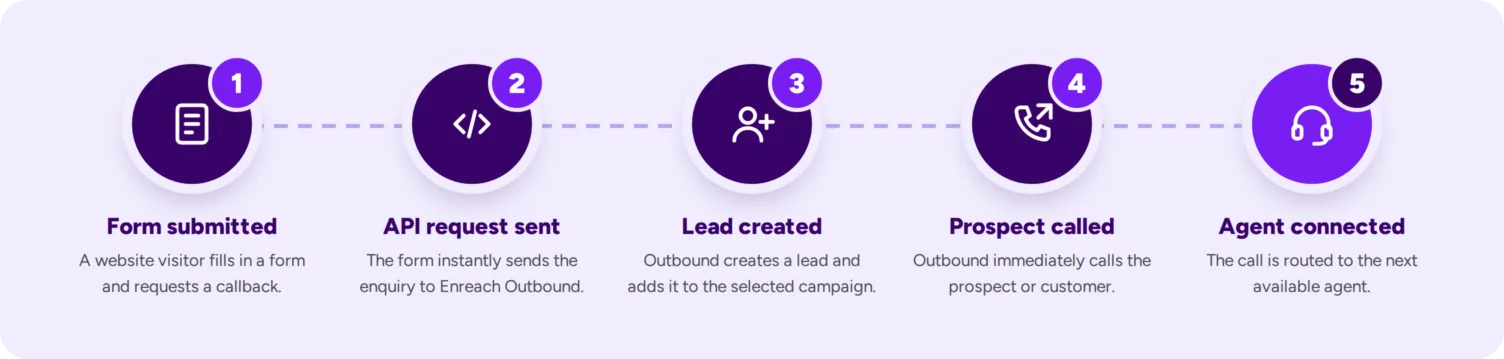
Enreach Outbound Web Callback connects website enquiries directly with your sales or support agents in real time, so there's no manual monitoring, dialling or list-building in between. The process runs like this:

  1. A visitor submits a form on your website with their contact details, requesting a callback.

  2. The form sends an API request to Outbound.

  3. Outbound creates a lead and adds it to the selected campaign.

  4. Outbound immediately calls the prospect or customer.

  5. The call is routed to the next available agent.

The result is a faster, more consistent journey from online interest to a human conversation.

How JFM increased website lead conversion by 157%

JFM, Denmark's second largest privately owned media group, wanted to follow up on web enquiries while prospects were still engaged. Using Web Callback, form submissions were routed straight to outbound agents within 5 to 30 seconds, often while the prospect was still on the website. Within three months, website lead conversion had increased by 157%.

As Commercial Chief Mikkel Banholdt put it: "It allows us to be as efficient as possible in converting web leads to sales and help our customers in the best possible way."

Read the full story in the JFM case study.

Align sales and marketing around the same measures

A faster response process works best when sales and marketing share responsibility for the outcome, looking past forms submitted and calls completed to what the two produce together. Useful measures include:

  • Time from form submission to first contact attempt, and to live conversation

  • Contact, qualification and conversion rates

  • Conversion by lead source

  • Reasons leads aren't contacted

  • Performance across different days and times

Tracking these together shows where follow-up breaks down, and can reveal whether a campaign generating fewer leads is actually producing more conversations and revenue.

Review the customer journey, not just the technology

Improving speed to lead isn't only about installing another tool. It's worth reviewing the whole process: what the prospect expects after submitting the form, who owns the enquiry, which system receives it, how it's prioritised, what happens when the responsible team is busy, what information reaches the agent, and how the result is measured. Technology can remove delays, but the workflow still needs clear rules and clear ownership.

From form submission to live conversation

Website leads shouldn't lose value while internal processes catch up. By connecting forms directly with Enreach Outbound, Web Callback lets businesses respond while the prospect is still engaged, prioritise high-intent enquiries and build a more connected journey between marketing and sales.

Speed to lead is easy to achieve with the quick-to-implement web callback widget from Enreach Outbound. Talk to us today by emailing: outbound@enreach.com or calling: +4570202304